Packages
Ravn Hitmarker
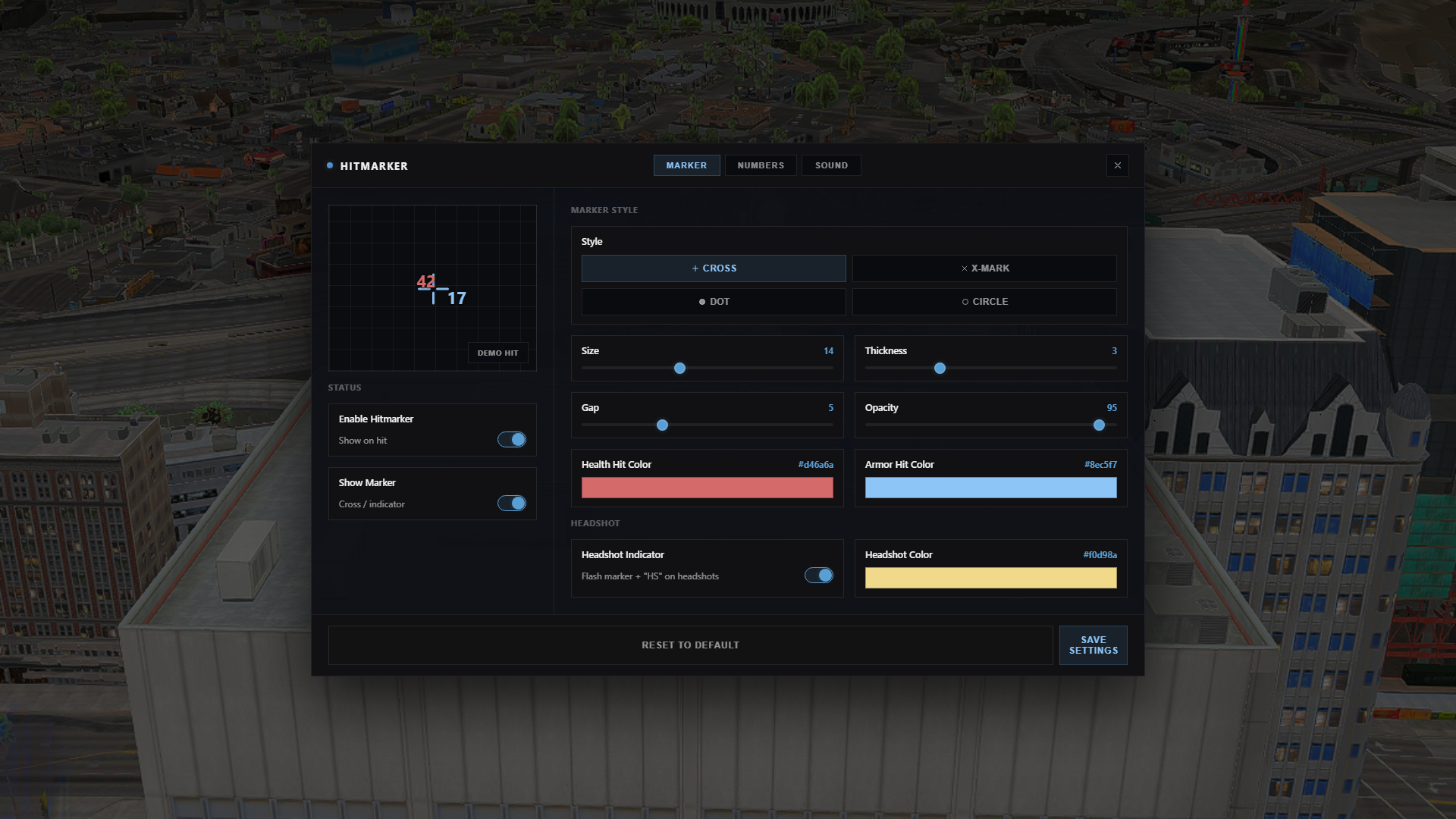
Feedback on every shot that lands: a marker on the crosshair, the damage floating off the target, a running total for the burst, and a click in your ears. The kind of thing players ask for the moment your server has any real gunplay.
Every part of it is a per-player setting, changed in game from a settings panel and remembered on that player's machine. You install it once; the players own their own crosshair.
| No framework. No database. No dependencies. Identical on ESX, QBCore, Qbox and fully standalone — it never touches player data. |
Damage that is actually correct
It does not read the raw weapon damage number. It keeps a fresh health-and-armour reading for every nearby player and reports the real difference the shot made — so armour, damage resistance and body-part multipliers are all reflected in what you see. Armour damage is shown in its own colour, health in another.
Headshots are detected from the bone that took the hit, then flash the marker gold and add an HS cue.
What players can change
- Marker style: cross, X, dot or circle
- Marker size, thickness, gap and opacity
- Separate colours for health hits, armour hits and headshots
- Damage number size and colours, on or off
- Running total for the burst, on or off
- Headshot indicator, on or off
- Hit sound: three built-in tones, or their own
.mp3/.oggfrom a URL - Sound volume
The three built-in hit sounds are generated in the browser — there are no audio files to ship, and no volume-boosted stream to hunt down.
It never blocks your players
The overlay takes no NUI focus. The settings panel is the only thing that does, and only while it is open. Nothing can leave a player stuck with a frozen mouse.
Install
Two steps. Drop in the folder, then:
ensure ravn_hitmarkerSettings are stored per player in FiveM's own key-value store — nothing to migrate, nothing to set up, and a player's crosshair follows them across your server restarts.
Requirements: none.
FAQ
Does it work without a framework?
Yes. It never reads player data, so there is nothing to be compatible with.
Where are a player's settings saved?
On their own machine, through FiveM's key-value store. No database, no server script, no per-character setup.
Does it show markers for NPCs?
No — it fires on hits you deal to other players. That keeps it quiet during scripted NPC content and honest in PvP.
Can players open it without a command?
Yes. /hitmarker and /hm both open it, and it registers a key mapping (F7 by default) that every player can rebind in FiveM's own keybind settings.
Can I change the commands or the default key?
Yes, in config.lua.
The key mapping follows the first command you list.
Can I translate it?
Copy locales/en.lua, translate the values, point Config.Locale at it. Missing keys fall back to English.
Is the code open?
The Lua is protected through the FiveM asset escrow system. config.lua and the locale files ship unencrypted so you can actually configure it.
Ravn Team Battle
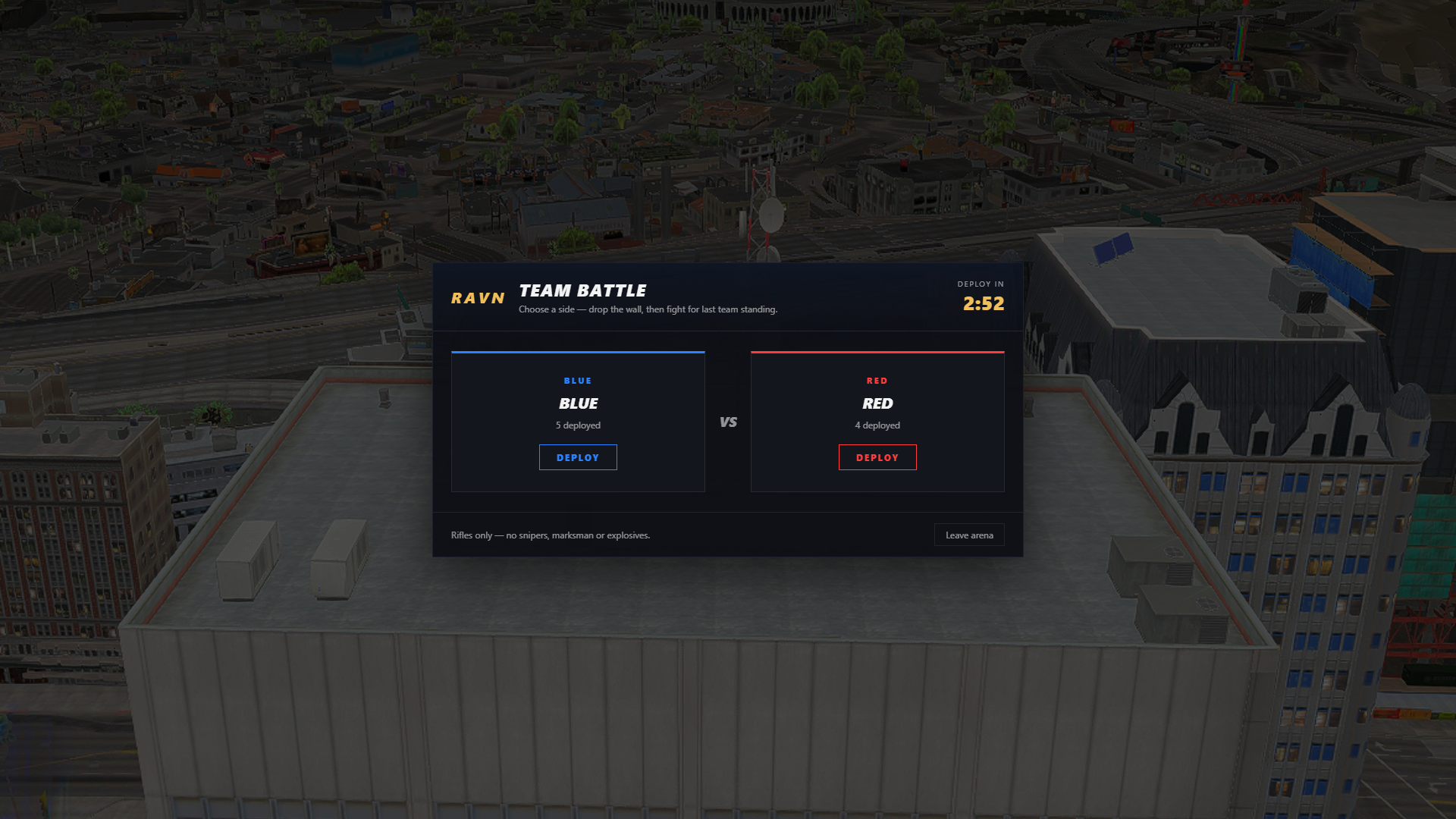
A round of Team Battle has a shape most arena scripts do not. The two teams start on opposite sides of a real, physical wall built out of collision objects. You cannot shoot through it and you cannot walk around it.
To fight, you first have to break it. Each side gets a set of objectives to capture — hold-to-complete tasks scattered around your half. Every capture takes a segment out of the wall's integrity, and the team that breaks the last one drops the wall for everyone. Then it is last team standing.
| No framework. No database. No dependencies. Identical on ESX, QBCore, Qbox and fully standalone. |
The phases
- Lobby — team select with live counts and a deploy timer, kept balanced within a configurable difference.
- Challenge — objectives go live. The HUD shows wall integrity as one segment per objective, shifting blue to amber to red as it nears collapse.
- Battle — the wall falls with a cinematic and both teams meet in the middle.
- End — win overlay, cash for every surviving winner, banked task points paid out, and an optional prize item for the winning side.
Anti-grief built in
Team kills, suicides and environment deaths respawn you instead of eliminating you — only a clean enemy kill takes you out of the round. A weapon filter keeps snipers, marksman rifles and explosives out of the arena, a vehicle filter keeps everything but the bike you allow out of it, and leaving the play area pulls you back.
It will not crash your server
The wall is a grid of collision objects, and GTA has a hard limit on how many of those a client can hold. The script counts what your config would spawn, automatically widens the spacing if it would go over, and prints exactly by how much. It will never spawn more than the cap for a single wall, whatever you put in the config.
Pairs with Ravn Win Sequence
If ravn_winsequence is installed, the end of a round plays through it — result headline, standings and countdown. Without it the round still ends cleanly, just without the overlay.
Configurable
Team names, colours, spawn points and spawn radius; the wall's position, size and spacing; how many objectives per side and where they sit; lobby length; the cash and item rewards; the banned weapon categories; the allowed vehicle; the arena boundary; and every string on screen. config.lua and locales/ ship unencrypted.
Install
ensure ravn_teamsRequirements: none.
FAQ
Do I need ESX or QBCore?
No. It runs on ESX, QBCore, Qbox or a completely standalone server.
Do I need a database?
No.
Is the wall really solid?
Yes — it is built from collision objects, not a marker or a script check. Players cannot shoot through it or walk around it.
What stops it spawning too many objects?
The script caps them. If your wall config would exceed what a client can hold it widens the spacing automatically and tells you by how much.
Can players grief their own team?
Team kills do not eliminate. Only a clean enemy kill takes someone out of the round; anything else respawns them.
Can I change the arena location?
Yes. Team spawns, the wall and the objective zones are all config entries.
Can I translate it?
Copy locales/en.lua, translate the values, point Config.Locale at it. Missing keys fall back to English.
Is the code open?
The Lua is protected through the FiveM asset escrow system. config.lua and the locale files ship unencrypted.
Ravn Crosshair
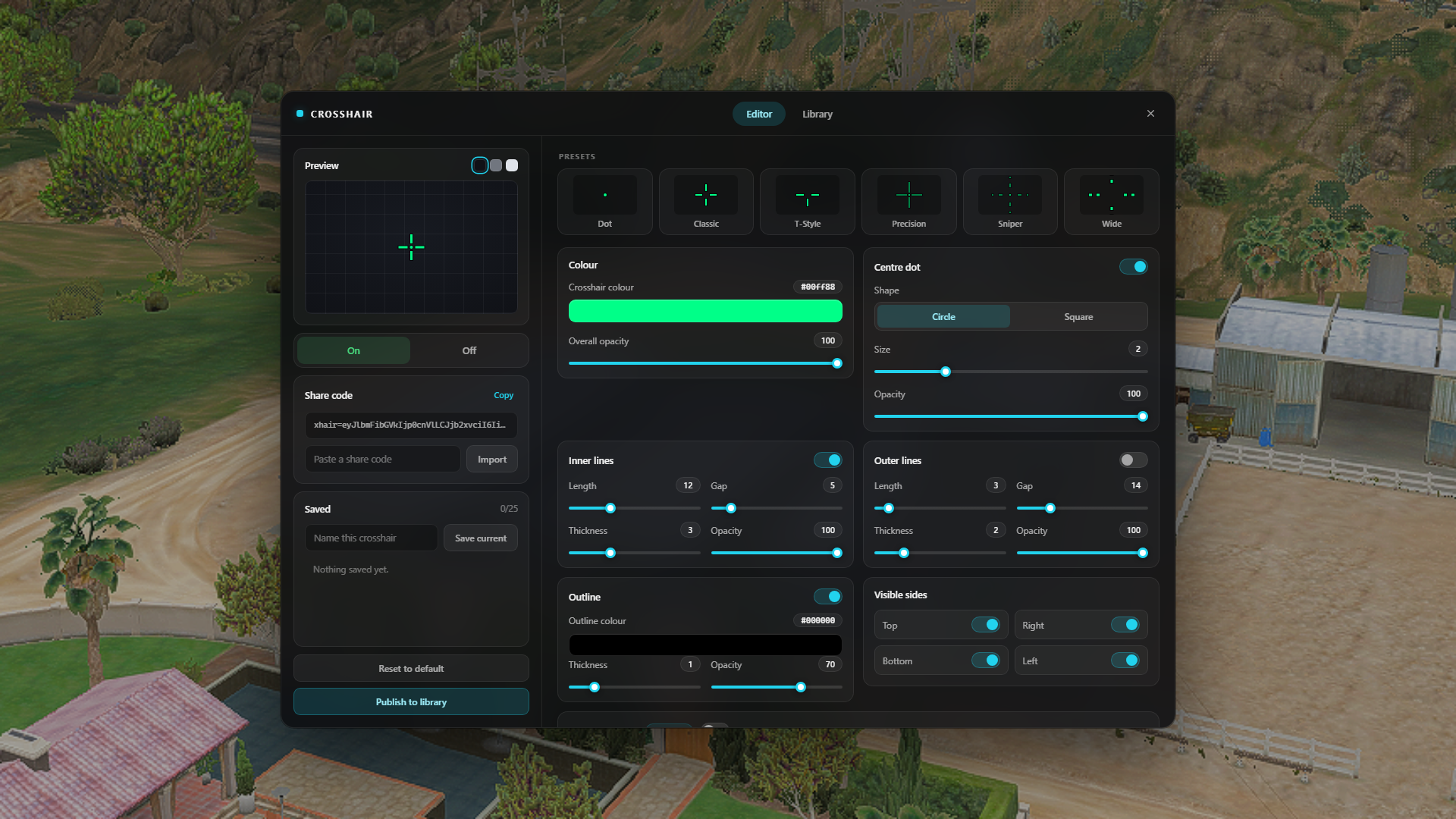
An in-game crosshair every player designs for themselves. /crosshair opens an editor with a live preview, and whatever is in that preview is what gets drawn over the world the moment they close it.
Colour and overall opacity. Four arms with their own length, gap, thickness and opacity, and a second outer set for a wider frame. A centre dot, round or square. An outline behind all of it so a bright crosshair still reads against snow or sky. Any of the four arms can be switched off on its own — that is all a T-style crosshair is.
| No framework. No database. No dependencies. Identical on ESX, QBCore, Qbox and fully standalone. |
The preview does not lie
The crosshair is drawn in screen pixels, and the preview is drawn in the same screen pixels, by the same geometry. A 7px arm in the editor is a 7px arm in game, at 1080p, 1440p or ultrawide. Three backdrop swatches sit above the preview — dark, neutral, bright — so a player can check their colour against a night street and against a desert before committing to it.
Share codes
Every crosshair is a short code. Copy it out of the editor, paste it in Discord, and anyone who pastes it back gets exactly that crosshair. Codes carry every setting, and a code made before an update still imports — anything it does not carry falls back to your default.
A server-wide library, if you want one
Players can publish a crosshair to a shared library with a name, and browse what everyone else has published — sorted by most used or newest, with a live preview drawn on every card and a use counter. One click copies it.
This is the only part that needs a database. With oxmysql installed the table is created on first start; without it the tab does not appear and nothing else changes. Players can delete their own entries, and anyone holding the crosshair.admin ACE can delete any of them.
Presets and saved sets
Six presets ship as plain data in config.lua — Dot, Classic, T-Style, Precision, Sniper, Wide — drawn as live thumbnails at the top of the editor. Edit them, add your own, remove the ones you do not want. On top of that each player keeps up to 25 named crosshairs, so a different one for a rifle, an SMG and a shotgun is two clicks away.
It matches your server
Config.Brand puts your server's name in the header. Config.Accent is one hex value that recolours the whole editor — buttons, sliders, switches, tabs, focus rings. The UI is deliberately neutral: no logo, no game-specific styling, nothing that makes it look like it was built for somebody else's server.
Nothing a player sends is trusted
Crosshairs arrive from a browser, and a published one gets drawn on other players' screens. Every value is rebuilt against a schema on the server before it is stored — types checked, ranges clamped, colours validated, names stripped of control characters and length-capped. Publishing and searching are rate limited.
Configurable
Command names and the default keybind; the starting crosshair; the preset list; how many crosshairs a player may keep; whether the library is on, how many entries one player may publish, the page size, the table name and the moderator ACE; the brand text; the accent colour; and every string on screen. config.lua, shared/schema.lua and locales/ ship unencrypted.
Install
ensure ravn_crosshairRequirements: none. Uses oxmysql for the library if it happens to be installed.
FAQ
Do I need a database?
No. Players' crosshairs are stored by the script itself. The shared library is the only feature that needs oxmysql, and it turns itself off without it.
Do I need ESX or QBCore?
No. It runs on ESX, QBCore, Qbox or a completely standalone server.
Does every player get their own?
Yes, and it follows them across rejoins. On multi-character servers it is per character.
Is the preview really 1:1?
Yes. Both the preview and the in-game crosshair are drawn in screen pixels from the same geometry, so the numbers mean the same thing in both places at any resolution.
Can I change the keybind?Config.OpenKeyMapping sets the default and players rebind it in the FiveM key bindings menu. /crosshair and /cross work regardless.
Can I translate it?
Copy locales/en.lua, translate the values, point Config.Locale at it. English and Danish ship. Missing keys fall back to English.
Is the code open?
The Lua is protected through the FiveM asset escrow system. config.lua, shared/schema.lua and the locale files ship unencrypted.
Ravn Kill Effects
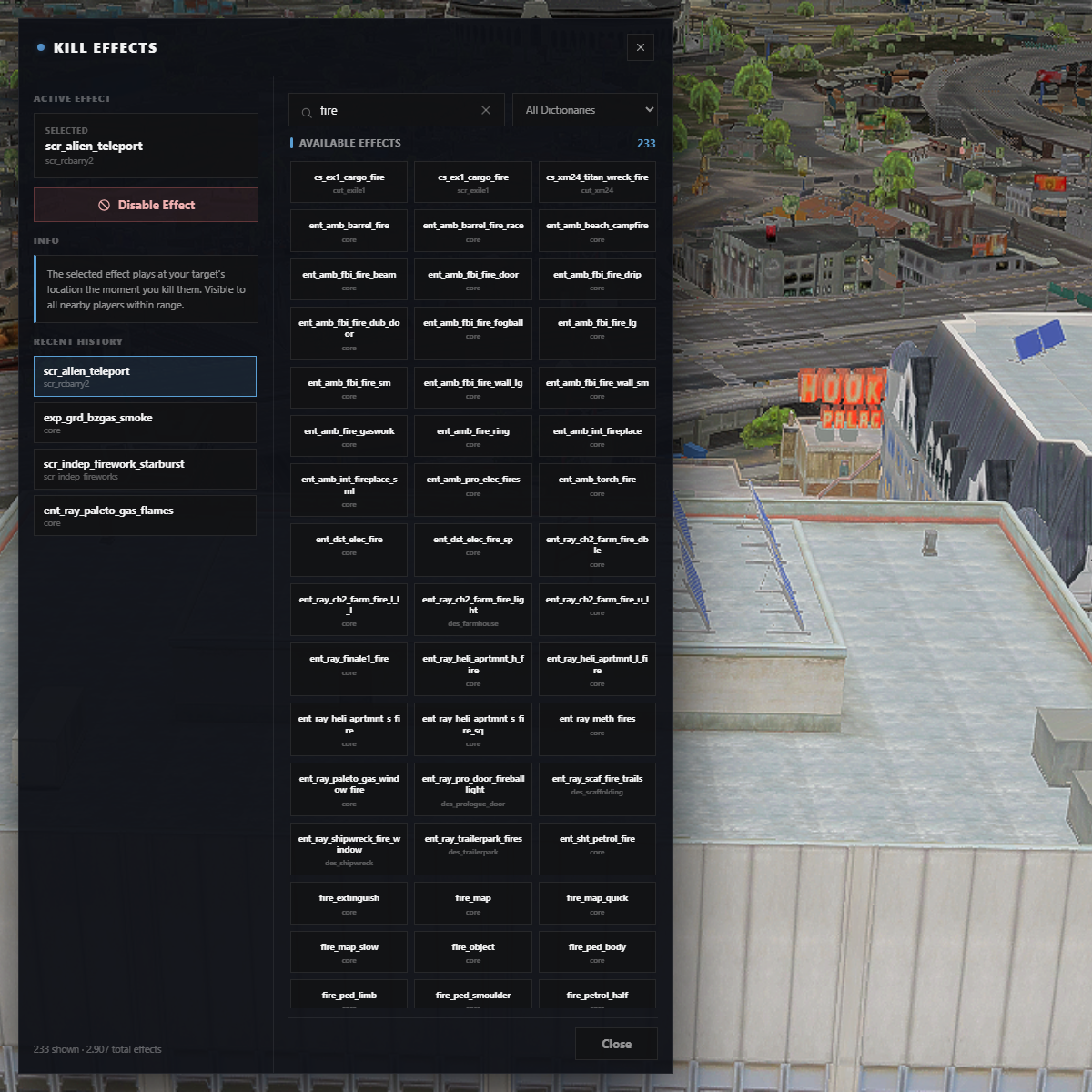
A kill effect is the small cosmetic your players will actually argue about. This gives every one of them the whole GTA particle library to choose from — 364 dictionaries, 2,907 effects — searchable, filterable, and previewed before they commit to it.
They pick it once. From then on it plays at the victim's feet every time they get a kill, for everyone close enough to see it.
| No framework. No database. No dependencies. Identical on ESX, QBCore, Qbox and fully standalone. Uses oxmysql automatically if you have it. |
Previewed on a mannequin, not on your face
Opening the menu spawns a frozen clone of the player's own ped a few metres in front of the camera, like a clothing-shop mannequin. Effects preview on the clone, so the player can actually see what they are choosing instead of setting off particles inside their own head. Their real character never moves, and the clone is invisible to everyone else.
It is the real particle list
Not a curated handful. It is GTA's own dictionaries, fetched once per server start and cached in memory, so there is no multi-megabyte file in the resource and the list follows the game rather than going stale. Search by name or dictionary, filter to one dictionary, and the last effects a player tried stay in a recent list.
Built for a busy server
- One outbound request for the effect list per server start, not per player
- Per-player cooldown, so a kill streak cannot turn into a wall of particles
- Distance culling — a kill across the map does not spend anyone's frames
- Looped effects stop themselves after a configurable time
- Kills are confirmed server-side, so a modified client cannot fire effects on demand
Configurable
Command and default key, draw distance, cooldown, effect scale, loop duration, whether NPC kills count, whether everyone or only the killer sees the effect, and the mannequin's position. config.lua and locales/ ship unencrypted.
Install
Two steps. Drop in the folder, then:
ensure ravn_killeffectsPlayer selections are stored through the built-in bridge: your database if you have oxmysql, FiveM's key-value store if you do not. Nothing to import, no table to create.
Requirements: none.
FAQ
Does it work without a framework?
Yes. It never reads player data. On a server with no framework it identifies players by their license and stores selections in FiveM's key-value store.
Do other players see the effect?
By default, yes — everyone within the configured draw distance. Set Config.ShowToEveryone = false if you would rather it stayed private to the killer.
Do I need a database?
No. If oxmysql is installed it will use it; otherwise it stores selections itself.
Does it work on NPC kills?
Off by default, since most servers only want it in PvP. Set Config.PlayersOnly = false to include them.
Can a player pick a broken effect?
They can pick any effect in the list. Anything that does not render is a GTA particle that does not render — the picker shows the game's own list rather than pretending to know which of 2,907 look good.
Can I translate it?
Copy locales/en.lua, translate the values, point Config.Locale at it. Missing keys fall back to English.
Is the code open?
The Lua is protected through the FiveM asset escrow system. config.lua and the locale files ship unencrypted so you can configure it.
Ravn Weapon Mods
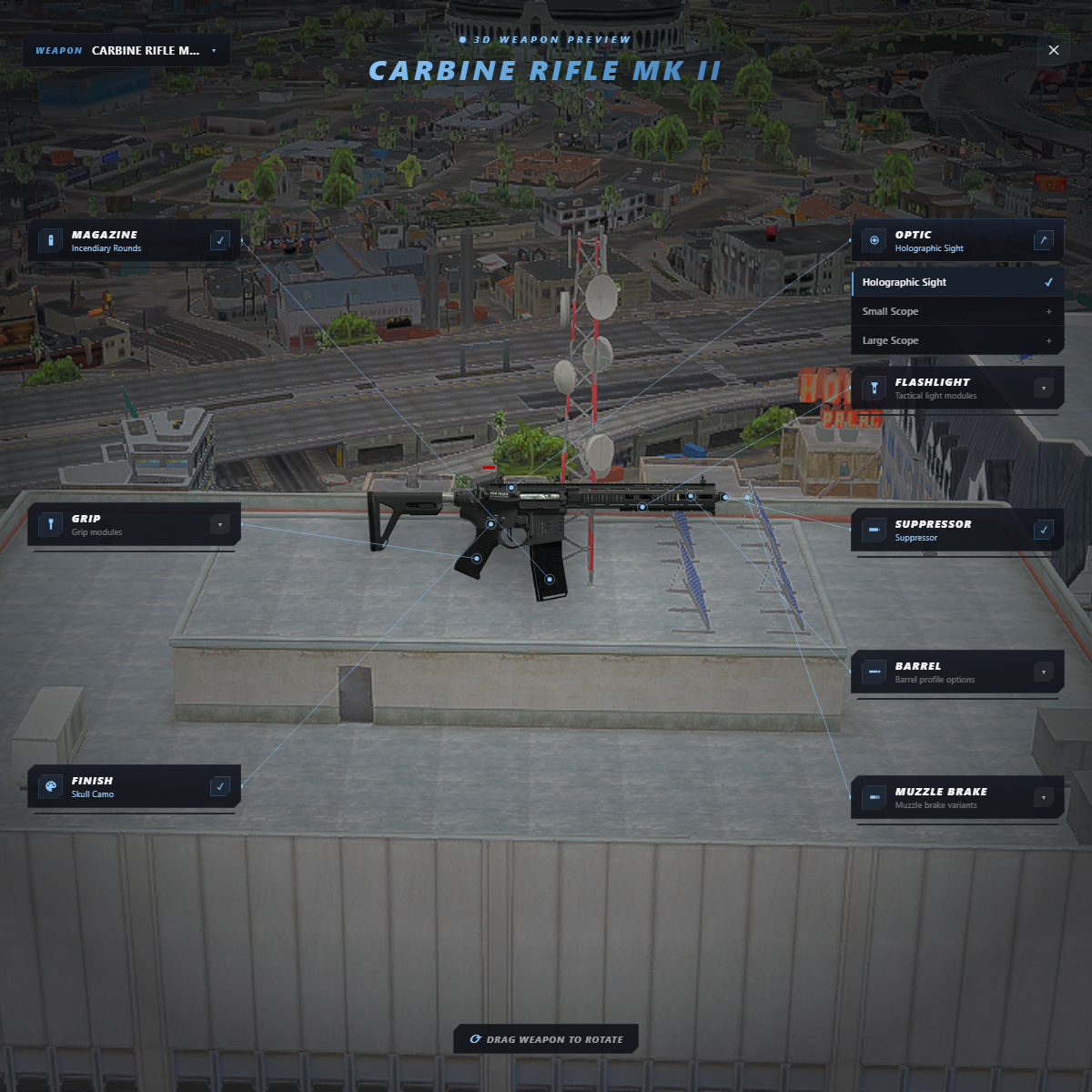
/weaponmod lifts the player's weapon out of their hands and floats it in front of them as a real 3D object, with the game world still visible behind it. Attachment cards sit either side, and each one is joined to its own attachment point on the model by a leader line that follows the weapon as it turns.
Drag anywhere to rotate it. Pick an option and it lands on the 3D preview and on the player's real weapon in the same moment, and is saved.
| No framework. No database. No dependencies. Identical on ESX, QBCore, Qbox and fully standalone. Uses oxmysql automatically if you have it. |
It stays applied
Saved attachments are re-applied when the player joins and every time they pull that weapon out again, so a loadout survives a rejoin, a death, or a weapon being handed back by another resource.
The catalog is yours
Every weapon, category and attachment lives in shared/catalog.lua, and it ships unencrypted. Add a weapon, drop an attachment you do not want players to have, rename anything — the UI, the validation, the persistence and the re-apply logic all read from that one file.
Out of the box it covers the MK II rifles, SMGs, shotguns, snipers and pistols with their clips, special ammo types and camos, plus the classic weapons with their tints: scopes, grips, flashlights, suppressors, barrels and muzzle brakes.
Nothing a player sends is trusted
Every choice is checked against the catalog on the server before it is stored, so a modified client cannot give itself an attachment the catalog does not allow for that weapon.
Configurable
- Command name and an optional keybind
- Whether players must be carrying the weapon to edit it
- Optional safe-zone restriction, with your own zones or
pvp_safezone - Preview distance, height, camera FOV, rotation and pitch speed
Exports
- Client:
OpenEditor(),CloseEditor(),IsEditorOpen() - Server:
GetPlayerWeaponMods(source[, weaponName])— so an inventory resource can apply saved mods in the same tick it hands the weapon over
Install
Two steps. Drop in the folder, then:
ensure ravn_weaponmodsRequirements: none.
FAQ
Do I need a database?
No. If oxmysql is installed it will use it; otherwise it stores attachments itself.
Does it work without a framework?
Yes. It identifies players by their license and never reads framework player data.
Can players open it anywhere?
By default yes. Set Config.RequireSafeZone = true and list your zones in Config.SafeZones to restrict it.
Can players edit a weapon they do not have?
Not by default. Config.RequireOwned = false shows the full catalog instead, which is useful while you are setting it up.
Can I add or remove weapons?
Yes — shared/catalog.lua ships unencrypted and is the single source for the UI, validation and persistence.
Can I translate it?
Copy locales/en.lua, translate the values, point Config.Locale at it. Missing keys fall back to English.
Is the code open?
The Lua is protected through the FiveM asset escrow system. config.lua, shared/catalog.lua and the locale files ship unencrypted.
Ravn Ranked Duels
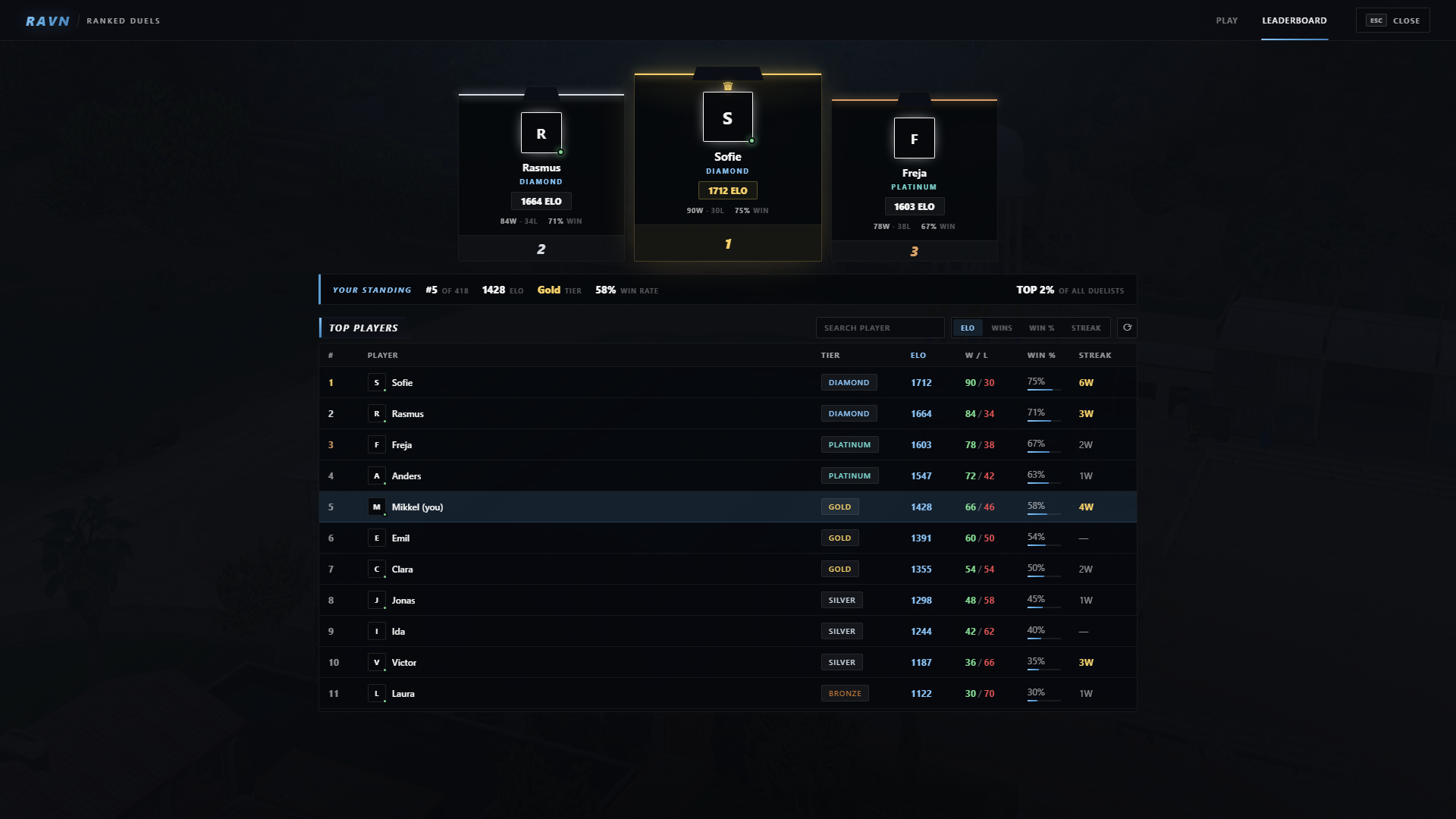
/duels turns your FiveM server into a competitive ranked 1v1 arena experience. Players enter the queue, get matched against opponents around their skill level, and fight inside private duel instances with ELO, ranks and leaderboard progression.
| Ranked 1v1 PvP system ELO matchmaking, ranks, leaderboard, match history and competitive progression built for serious FiveM servers. |
Private duel arenas
Every match runs inside its own routing bucket, allowing multiple duels to happen at the same time without players interfering with each other or the main world.
Ranked progression
Every ranked match affects player progression. Track wins, losses, ELO and ranks while players compete for the top spot on your server leaderboard.
Competitive features
- ELO based matchmaking
- Rank system
- Leaderboard
- Match history
- Round based duels
- Map voting
- Loadout voting
- Rematch system
- Player challenges
- Live duel HUD
Works with your server
Includes a framework bridge supporting ESX, QBCore, Qbox and fully standalone servers.
Database support
Player progression is stored through oxmysql, including:
- ELO rating
- Ranks
- Match results
- Leaderboard statistics
Secure server logic
Important match decisions are handled server-side. Players cannot give themselves wins, modify ELO or manipulate duel results through the client.
Configurable
- Match settings
- Round limits
- Timers
- Arena locations
- Loadouts
- Framework settings
Exports
- Client:
IsInDuels(),JoinDuels(),LeaveDuels() - Server:
GetPlayerElo(),IsPlayerInArena()
Install
Drop the resource into your server and add:
ensure ravn_duelsRequirements: oxmysql
FAQ
Does it work with ESX?
Yes. The framework bridge supports ESX, QBCore, Qbox and standalone.
Can multiple fights happen at once?
Yes. Every duel uses its own routing bucket.
Does it save player progression?
Yes. ELO, ranks and match statistics are stored through oxmysql.
Can I configure the system?
Yes. Match rules, arenas, rounds, timers and loadouts can be configured.
Is the code open?
The Lua is protected through the FiveM asset escrow system.
Free
Ravn Win Sequence
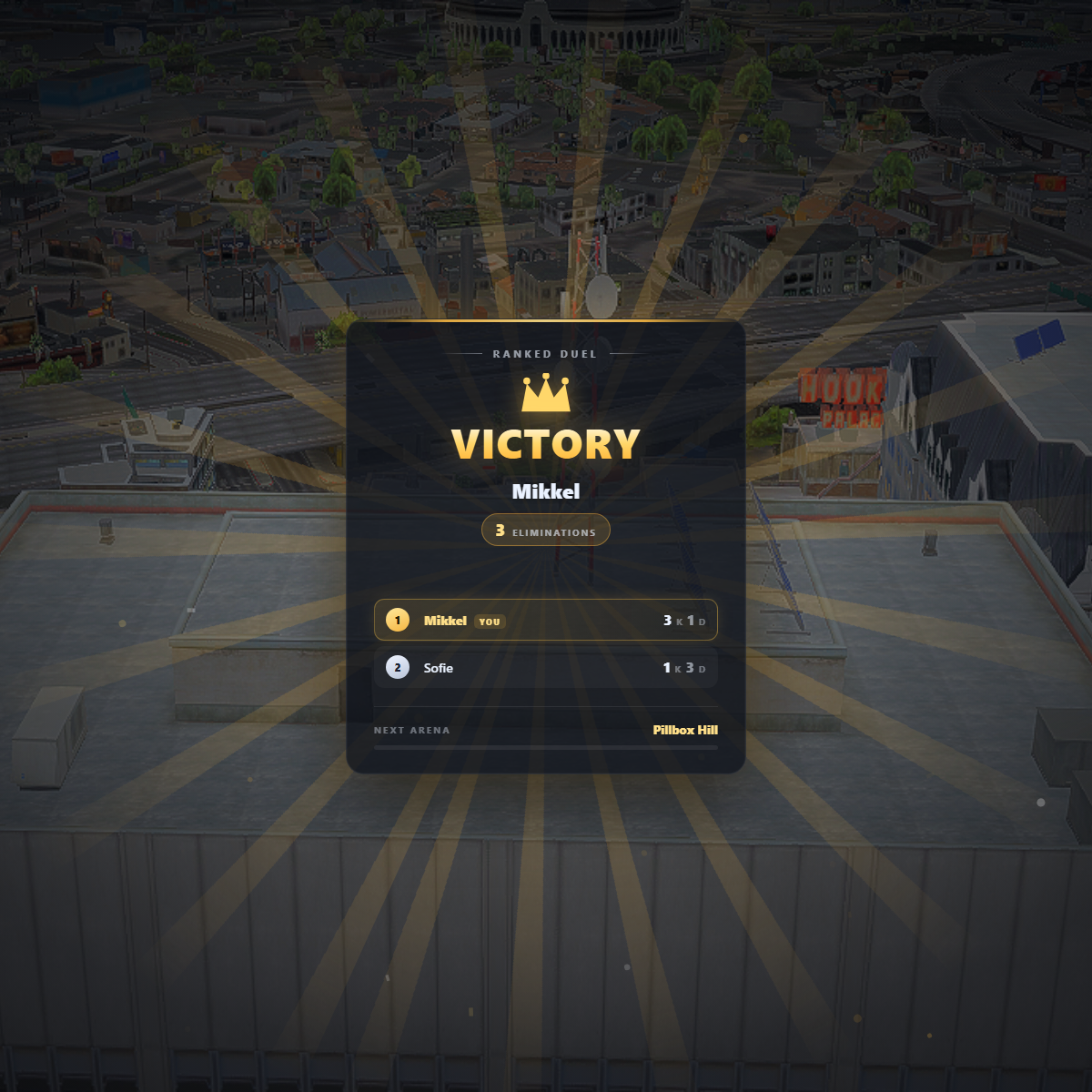
Every arena script ends a round the same way: a chat message and a teleport. This replaces that with a proper end-of-round moment — result headline, the winner, a standings board, and a countdown to whatever comes next.
It is deliberately a single job done well. It does not run your arena, track your scores, or own your game loop. You send it a payload when a round ends and it handles the presentation.
| No framework. No database. No dependencies. Identical on ESX, QBCore, Qbox and fully standalone — it only draws what you send it. |
One payload, personalised per player
The overlay works out on its own whether the viewer won, lost or drew, and adjusts the headline, colours and confetti for each player individually. You send the same payload to everyone.
TriggerClientEvent('ravn_winsequence:play', src, {
    title  = 'PISTOL ARENA',
    accent = 'gold',
    winner = { id = 12, name = 'Mikkel', kills = 7 },
    standings = {
        { id = 12, name = 'Mikkel', kills = 7, deaths = 2 },
        { id = 34, name = 'Sofie',  kills = 5, deaths = 4 },
    },
    nextMap = 'School',
})
Or client-side via exports.ravn_winsequence:Play(payload).
It never blocks your players
The overlay takes no NUI focus. Players can still move, shoot and type while it is on screen. That matters for rotating arenas where the next round starts before the overlay finishes.
Features
- Victory / defeat / draw states, decided per player from the payload
- Standings board with medal colours, your own row highlighted
- Animated elimination counter and a live countdown footer
- Five accent themes, or add your own in the stylesheet
- “You placed 3rd · 5 kills” chip for players who did not win
- Confetti only for the actual winner
- Fully translatable, English included
- Hides itself if the resource stops, so it can never get stuck on screen
Configurable
Duration and a min/max clamp, standings row count, sorting, accent list, sound cues, and every piece of on-screen text. config.lua and locales/ ship unencrypted so you can edit them.
Install
Two steps. Drop in the folder, then:
ensure ravn_winsequenceRequirements: none.
FAQ
Does it work without a framework?
Yes. It never reads player data, so there is nothing to be compatible with.
Will it block my players from moving?
No. It never takes NUI focus.
Can I use it with my own arena script?
That is what it is for. Any script that knows who won can drive it.
Can I translate it?
Copy locales/en.lua, translate the values, point Config.Locale at it. Missing keys fall back to English.
Does it need a database?
No.
Is the code open?
The Lua is protected through the FiveM asset escrow system. config.lua and the locale files ship unencrypted, and the payload contract is documented in the README and in the code header.